 b53946bebb
Upstream has released updates that appear to apply and compile correctly

Paper Changes:
PaperMC/Paper@cc491a3 Finish updating chunk system patch
PaperMC/Paper@619d7c9 Add in some patches
PaperMC/Paper@902691b Apply last patch
PaperMC/Paper@efb4197 Fix final compilation issues
PaperMC/Paper@57a5924 Fix boot errors
PaperMC/Paper@c1def9d Updated Upstream (CraftBukkit/Spigot)
PaperMC/Paper@a0a2e72 fix sculk npe
PaperMC/Paper@318a08c add missing block entity type to CraftBlockStates
PaperMC/Paper@aed9ef0 Update adventure
PaperMC/Paper@9d42879 Fix breaking pots throwing exception
PaperMC/Paper@59060aa fix some failing tests
PaperMC/Paper@e325e37 add missing call to EntityInsideBlockEvent
PaperMC/Paper@8ce5219 Fix inconsistent chunk sending with vanilla
PaperMC/Paper@04509f0 Fix crash relating to "Already sent chunk"
PaperMC/Paper@c9eb393 Updated Upstream (Bukkit)
PaperMC/Paper@21f2d15 Avoid duplicate poi entries from the first section (#9235)
PaperMC/Paper@3621d76 Fix collision between AABB and a dot (#8733)
PaperMC/Paper@ccb194b Move block farther away for Player#setRotation (#8514)
PaperMC/Paper@03c3587 fix not editable sign after openSign
PaperMC/Paper@6d74ad1 Finish tests & bad calls
PaperMC/Paper@e829a9d Fix javadoc
PaperMC/Paper@82c6479 Add back Anti-Xray patch (#9283)
PaperMC/Paper@0d969f0 comment out update logic from build.gradle.kts
PaperMC/Paper@ea9fdc3 Ignore inline definitions of trim material & pattern
PaperMC/Paper@9ada4bd Prevent the rcon thread from attempting connections after shutdown
PaperMC/Paper@c9e125f Fix setListenerRange for calibrated sculk sensors
PaperMC/Paper@9ebf75d fix some more 1.20 tracking issues
PaperMC/Paper@f9fc44f add side to PlayerSignCommandPreprocessEvent
PaperMC/Paper@4e3febb fix missing trigger entity for xp orb from breeding
PaperMC/Paper@4b5f847 Minimise EntityFertilizeEggEvent and add sniffer (#9280)
Purpur






Purpur is a drop-in replacement for Paper servers designed for configurability, new fun and exciting gameplay features, and performance built on top of Paper.
Contact
Join us on Discord:

Downloads
Downloads can be obtained from the downloads page or the downloads API.

Downloads API endpoints:
- List versions of Minecraft with builds available:
https://api.purpurmc.org/v2/purpur - List builds for a version of Minecraft:
https://api.purpurmc.org/v2/purpur/<version> - Download a specific build of a specific version:
https://api.purpurmc.org/v2/purpur/<version>/<build>/download - Download the latest build for a version of Minecraft:
https://api.purpurmc.org/v2/purpur/<version>/latest/download
License
All patches are licensed under the MIT license, unless otherwise noted in the patch headers.
See PaperMC/Paper, and PaperMC/Paperweight for the license of material used by this project.
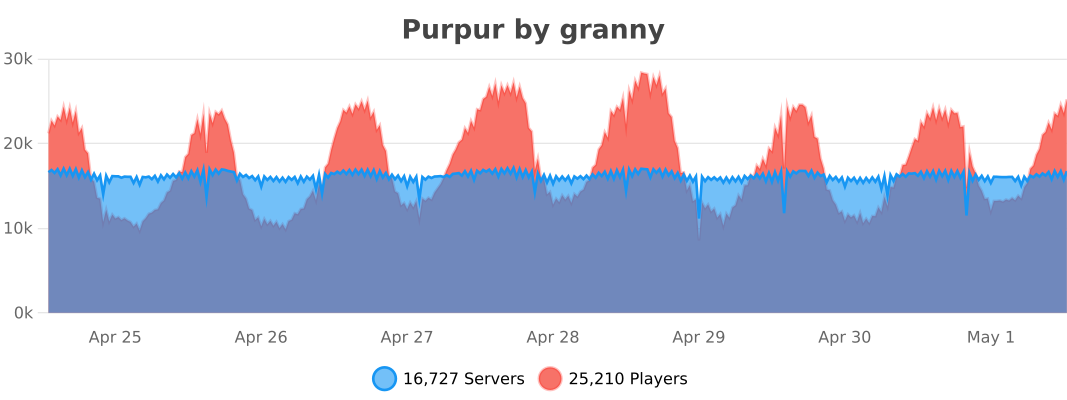
bStats
API
Javadoc
Dependency Information
Maven
<repository>
    <id>purpur</id>
    <url>https://repo.purpurmc.org/snapshots</url>
</repository>
<dependency>
    <groupId>org.purpurmc.purpur</groupId>
    <artifactId>purpur-api</artifactId>
    <version>1.20-R0.1-SNAPSHOT</version>
    <scope>provided</scope>
</dependency>
Gradle
repositories {
    maven("https://repo.purpurmc.org/snapshots")
}
dependencies {
    compileOnly("org.purpurmc.purpur:purpur-api:1.20-R0.1-SNAPSHOT")
}
Yes, this also includes all API provided by Paper, Spigot, and Bukkit.
Building and setting up
Initial setup
First, clone this repository. Do not download it.
Then run the following command in the root directory:
./gradlew applyPatches
The project is now ready for use in your IDE.
Creating a patch
Patches are effectively just commits in either Purpur-API or Purpur-Server.
To create one, just add a commit to either repo and run ./gradlew rebuildPatches, and a
patch will be placed in the patches folder. Modifying commits will also modify its
corresponding patch file.
See CONTRIBUTING.md for more detailed information.
Compiling
Use the command ./gradlew build to build the API and server. Compiled JARs
will be placed under Purpur-API/build/libs and Purpur-Server/build/libs.
These JARs are not used to start a server.
To compile a server-ready purpurclip jar, run ./gradlew createReobfPaperclipJar.
To install the purpur-api and purpur dependencies to your local Maven repo, run ./gradlew publishToMavenLocal. The compiled purpurclip jar will be in build/libs/ not Purpur-Server/build/libs.
Special Thanks To:
YourKit
YourKit, makers of the outstanding Java profiler, support open source projects of all kinds with their full-featured Java and .NET application profilers. We thank them for allowing us to use their software so we can make Purpur the best it can be. |
JetBrains
JetBrains, creators of the IntelliJ IDEA, supports Purpur with one of their Open Source Licenses. IntelliJ IDEA is the recommended IDE for working with Purpur, and most of the Purpur team uses it. |

